Wiggle Wiggle Wiggle Wiggle Wiggle (Yeah)
WITH FLOWFRAMES (AI Interpolator)
Open image in Photoshop
- Duplicate (Ctrl+J)
- Crop to one image at a ratio of 5:7
- Set top layer blend type to Difference
- Align the images on top of each other, making sure the focal point is lined up
- Change blend type back to normal
- Crop image so that edges aren't showing
- Save each layer as a .jpg or .png (Export > Layers to Files)
- Put in a folder by itself in this order: Left, Right, Left
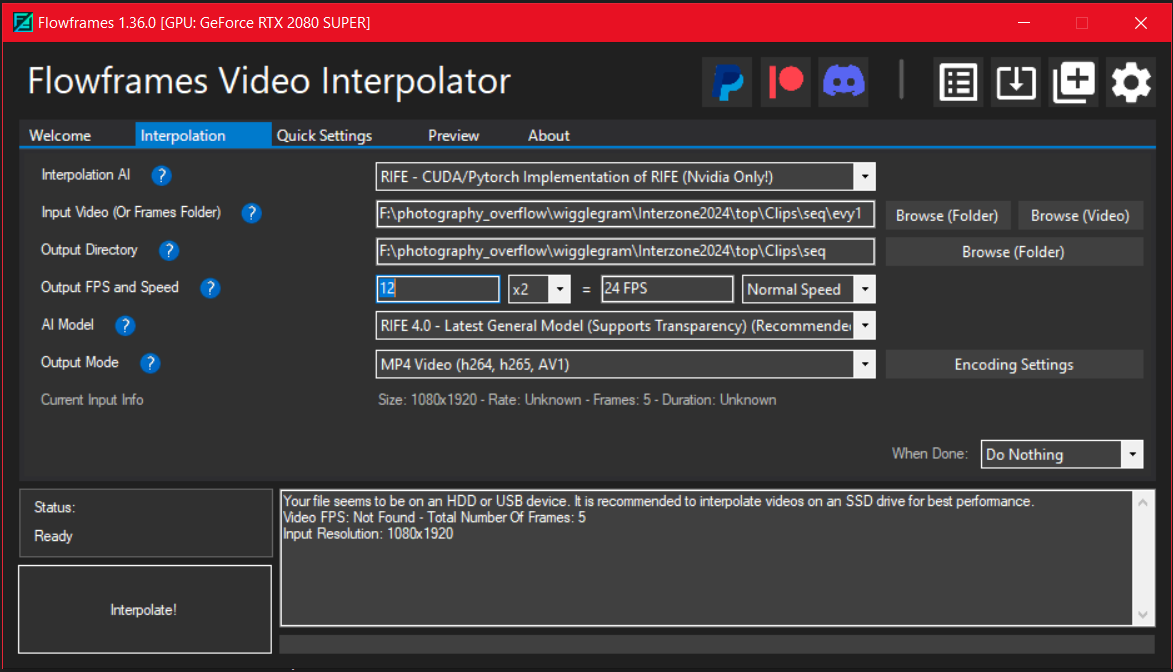
- >>Interpolation
- Interpolation AI: RIFE - CUDA/Pytorch (Nvidia Only)
- Input Video: Select folder with the two images
- Output Directory: Select output folder
- Output FPS & Speed: 12, x2, = 24FPS, Normal Speed
- RIFE 4.0
- AI Model: Rife 4.0 - Latest Gen Model
- Output MP4 Video
- Click "Interpolate!"
In DaVinci Resolve:
- Import the MP4 you just exported
- Go to edit tab
- Create a timeline with a vertical resolution matching your mp4, set to 24fps
- Drag & drop the mp4 into your timeline
- Trim the very last frame from the clip
- Copy/paste the clip on your timeline as many times as you like
- Select all, right click, New Compound Clip
- Add Deflicker effect
- Add any other effects, zooms, color grading, audio, etc. if you want
- Go to Deliver tab
- Export in whatever format you like (I do MP4 H.264)
WITHOUT FLOWFRAMES
Open image in Photoshop
- Duplicate (Ctrl+J)
- Crop to one image at a ratio of 5:7
- Set top layer blend type to Difference
- Align the images on top of each other, making sure the focal point is lined up
- Change blend type back to normal
- Crop image so that edges aren't showing
- Save each layer as a .jpg or .png (Export > Layers to Files)
- Rename files sequentially (ex. "img_1", "img_2")
In DaVinci Resolve:
- Go to edit tab
- Create a timeline with a vertical resolution matching your image size, set to 24fps
- Right click in the media pool, Import Media (Ctrl+i)
- Select your two images (it should import as an image sequence)
- Drag & drop the clip into your timeline
- Copy/paste the clip on your timeline as many times as you like
- Select all, right click, New Compound Clip
- Add Deflicker effect
- Add any other effects, zooms, color grading, audio, etc. if you want
- Go to Deliver tab
- Export in whatever format you like (I do MP4 H.264)